
Want a fast and simple way to compress WebP images without losing quality? This webp compressor online tool helps you reduce WebP file size directly in your browser—no downloads, no sign-ups, and no waiting. Whether you’re optimizing images for websites, improving loading speed, or saving storage space, this tool makes WebP compression smooth and efficient.
What This Tool Does
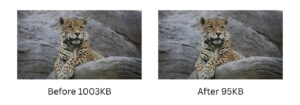
Our webp compressor online is built to shrink WebP image sizes while preserving excellent visual quality. WebP is already an efficient format, but this tool takes it further by removing unnecessary data and optimizing encoding. The result: smaller files that load faster without noticeable quality loss.
Key Benefits
Completely Free – Use it anytime with no cost or hidden fees
Browser-Based – Works on all devices without installing software
No Upload to Server – Your images stay on your device for maximum privacy
No Limits – Compress as many files as you want, whenever you need
How to Use (3 Simple Steps)
Upload Your WebP Image
Drag and drop your file into the tool or click to select it from your device.Choose Compression Level (Optional)
Adjust the balance between quality and file size based on your needs.Download the Compressed File
Instantly save your optimized WebP image and use it anywhere.
Frequently Asked Questions
1. Will compressing WebP reduce image quality?
There may be a slight reduction in quality depending on the compression level, but this tool is optimized to keep images looking sharp. In most cases, the difference is barely noticeable.
2. Is my data safe when using this tool?
Yes. All processing happens locally in your browser, so your files are never uploaded or stored on any server. Your images remain private and secure.
More Free Image Compression Tools
Looking to compress other image formats? We also offer free online tools for JPEG compression, PNG compression, and other popular formats. All tools are browser-based, completely free, and require no sign-up.
WebP is one of the best choices for web images, as Google’s image optimization guide explains — it delivers smaller file sizes than JPEG and PNG while supporting both transparency and animation. You can learn more about the format directly from Google’s WebP overview.
| Format | File Size | Transparency | Animation |
|---|---|---|---|
| PNG | Large |  |  |
| JPEG | Medium | | |
| WebP | Small | | |
| WebP (Compressed) | Smallest | | |
Start using this webp compressor online now to compress WebP images quickly and reduce WebP file size without compromising performance or quality.