
Looking for a quick and easy way to compress JPG images without sacrificing quality? This JPG compressor online tool is designed to help you reduce JPG file size directly in your browser—no downloads, no sign-ups, and no hassle. Whether you’re optimizing images for a website, email, or storage, this tool delivers fast and reliable results in seconds.
What This Tool Does
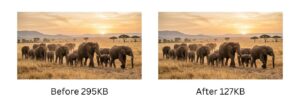
Our JPG compressor online allows you to shrink image file sizes while maintaining visual clarity. It uses smart compression techniques to balance quality and size, so your images stay sharp but load faster and take up less space.
Key Benefits
100% Free – No hidden fees or subscriptions
Browser-Based – Works on any device without installing software
No Upload to Server – Your images stay private and secure on your device
No Limits – Compress as many images as you want, anytime
How to Use (3 Simple Steps)
Upload Your JPG
Drag and drop your image or click to select a file from your device.Adjust Compression (Optional)
Choose your preferred balance between quality and file size.Download the Compressed Image
Instantly get your optimized JPG ready for use.
Frequently Asked Questions
1. Will compressing a JPG reduce image quality?
Compression may slightly affect image quality, but this tool is optimized to minimize visible differences. In most cases, you’ll barely notice any change while enjoying a much smaller file size.
2. Is my image safe when using this tool?
Yes. This tool works entirely in your browser, meaning your files are never uploaded to a server. Your images remain private and secure at all times.
Why Compress JPG Images Online?
JPG is the most widely used format for photos and web images — but unoptimized JPG files can slow down your website and hurt your search rankings. Using a JPG compressor online lets you reduce JPG file size in seconds, directly in your browser, without installing any software.
Page speed is a confirmed Google ranking factor. According to Google’s image optimization guide, images are typically the largest contributor to page weight. Properly compressed JPG images can cut load times significantly. You can learn more about modern image formats from Google’s web performance documentation.
More Free Image Compression Tools
Need to compress other formats? Try our free PNG compressor to reduce PNG file size while keeping full transparency, or use our WebP compressor for even smaller web-optimized images. All tools are browser-based, completely free, and require no sign-up.
| Format | Best For | Transparency |
|---|---|---|
| JPG | Photos, web images | ❌ No |
| PNG | Logos, graphics | ✅ Yes |
| WebP | All web images | ✅ Yes |
Start using this JPG compressor online today and make your images lighter, faster, and easier to share.