
Choosing the best image format for the web is no longer as simple as choosing between JPG and PNG.
Modern websites can use WebP, AVIF, JPG, PNG, and SVG — and each format is better suited to a different type of image.
The short answer is:
WebP is the best practical all-around choice for most website images. AVIF can produce even smaller files for photographs, SVG is ideal for logos and icons, PNG remains useful for screenshots and lossless graphics, and JPG is still a reliable fallback.
The right format can reduce page weight without noticeably reducing visual quality. That can make your pages load faster and improve the overall user experience.
Best Image Format for Web: Quick Answer
| Use Case | Best Choice | Alternative |
|---|---|---|
| Website photos | WebP / AVIF | JPG |
| Hero images | WebP / AVIF | JPG |
| Product photos | WebP / AVIF | JPG |
| Logos | SVG | PNG / WebP |
| Icons | SVG | PNG |
| Screenshots with text | PNG | WebP |
| Transparent images | WebP / PNG | AVIF |
| Simple illustrations | SVG | WebP / PNG |
| Animated images | WebP or video | GIF |
| Maximum compatibility | JPG / PNG | — |
For most website owners who want a simple answer, WebP provides the best balance between file size, image quality, browser support, and ease of use.
But “best” changes depending on what the image contains.
The 5 Main Image Formats for Web Compared
1. WebP — Best All-Around Format for Most Websites
WebP was designed specifically for web images and supports both lossy and lossless compression.
It also supports transparency and animation, which means it can replace JPG, PNG, and sometimes GIF depending on the use case.
Best for:
- Blog images
- Product photos
- Hero images
- Website backgrounds
- Images requiring transparency
- General website photography
WebP is especially useful when you want smaller files without changing how your website looks.
For most modern websites, it is the safest default choice.
When WebP may not be ideal:
If the image will frequently be downloaded, printed, emailed, or edited outside a browser, JPG or PNG may still be more convenient for the end user.
2. AVIF — Best When Minimum File Size Matters
AVIF is a newer image format based on AV1 image compression.
It supports:
- Lossy compression
- Lossless compression
- Transparency
- HDR
- High bit depth
AVIF can often achieve excellent visual quality at very small file sizes.
Unlike a few years ago, AVIF support is now available across current versions of the major browsers, including Chrome, Firefox, Safari, and Edge.
Best for:
- Large website photographs
- Hero images
- Image-heavy websites
- Projects where reducing transferred bytes is especially important
Possible disadvantages:
AVIF encoding can take longer than JPG or WebP, and some image workflows, CMS plugins, editors, or older devices may still handle WebP more conveniently.
For that reason:
AVIF may win on compression, while WebP often wins on simplicity.
3. JPG (JPEG) — Best Universal Format for Photos
JPG has been the standard format for digital photographs for decades.
It uses lossy compression, which removes some image information to make files smaller.
Best for:
- Photographs
- Product images
- Email images
- Images that need maximum compatibility
- Files that users may download and open outside the browser
Advantages:
JPG is supported virtually everywhere and works well for photos with complex colors and gradients.
Disadvantages:
- No transparency
- Usually larger than an efficiently encoded WebP or AVIF image
- Repeated saving can gradually reduce quality
For new websites, JPG is usually better treated as a reliable fallback rather than the automatic first choice.
4. PNG — Best for Lossless Graphics and Screenshots
PNG uses lossless compression.
That means image information can be preserved without the type of compression artifacts commonly associated with heavily compressed JPG images.
Best for:
- Screenshots containing text
- UI graphics
- Images with transparent backgrounds
- Diagrams
- Graphics requiring sharp edges
- Images that must remain lossless
PNG is usually a poor choice for large photographs because file sizes can become much larger than JPG, WebP, or AVIF.
For logos and icons, SVG should also be considered before PNG.
5. SVG — Best for Logos and Icons
SVG is different from JPG, PNG, WebP, and AVIF because it is a vector format.
Instead of storing the image as a fixed grid of pixels, SVG describes shapes mathematically.
That means an SVG logo can remain sharp whether displayed at 40 pixels or 4,000 pixels.
Best for:
- Logos
- Icons
- Simple illustrations
- Interface graphics
- Diagrams
SVG is not intended for normal photographs.
For a company logo or simple icon, however, SVG is often the best format available.
WebP vs AVIF vs JPG vs PNG vs SVG: Side-by-Side Comparison
| Feature | JPG | PNG | WebP | AVIF | SVG |
|---|---|---|---|---|---|
| Lossy compression | Yes | No | Yes | Yes | N/A |
| Lossless compression | No | Yes | Yes | Yes | N/A |
| Transparency | No | Yes | Yes | Yes | Yes |
| Best for photos | Good | Poor | Excellent | Excellent | No |
| Best for graphics | Fair | Excellent | Excellent | Fair | Excellent |
| File size efficiency | Good | Low for photos | Excellent | Excellent | Excellent for simple vectors |
| Modern browser support | Excellent | Excellent | Excellent | Excellent | Excellent |
| Scalable without quality loss | No | No | No | No | Yes |
There is therefore no single format that wins every category.
Which Image Format Is Best for Website Speed?
For website speed, the best format is usually the format that provides the required visual quality using the fewest bytes.
For photographs, that commonly means:
AVIF or WebP → JPG → PNG
But image format is only one part of optimization.
A 3 MB WebP image is still badly optimized if the browser only displays it at 800 pixels wide.
Website speed also depends on:
- Image dimensions
- Compression level
- Responsive image delivery
- Lazy loading
- Caching
- CDN configuration
- How early important images are loaded
Modern formats can help reduce transferred data, but switching formats alone does not guarantee better search rankings.
Google says Core Web Vitals are used by its ranking systems as part of a broader assessment of page experience, but good Core Web Vitals do not guarantee top rankings.
What Is the Smallest Image Format for Web?
There is no universal smallest format because the result depends on the image.
For a photograph:
AVIF frequently produces extremely small files at comparable visual quality. WebP is also highly efficient and often easier to use.
For a simple logo:
SVG can be dramatically smaller than any raster format.
For a screenshot with flat colors and text:
PNG may sometimes compress surprisingly well.
This is why choosing the smallest format based only on its name can be misleading.
The best method is to test the actual image.
Real-World File Size Comparison
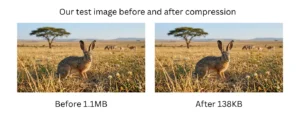
We tested the same 1200 × 800 image using different formats and compression settings.
| Format | Quality Setting | File Size | Notes |
|---|---|---|---|
| PNG | Lossless | 1.8 MB | Original |
| JPG | 90% | 420 KB | High quality |
| JPG | 75% | 185 KB | Recommended balance |
| WebP | 90% | 280 KB | High quality |
| WebP | 75% | 110 KB | Recommended balance |
| PNG | Compressed | 95 KB | After compression |
In this specific test, WebP at 75% was about 41% smaller than JPG at 75%.
The important phrase here is “in this test.”
Compression results vary significantly depending on:
- Image content
- Dimensions
- Encoder
- Quality setting
- Transparency
- Number of colors
This is why real-image testing is more useful than assuming one format will always be a fixed percentage smaller.
Best Image Format by Use Case
Best Format for Photos
Use WebP or AVIF for most website photography.
Use JPG when you need maximum compatibility outside the browser.
Avoid PNG for photographs unless you specifically need lossless storage.
Best Format for Logos
Use SVG whenever possible.
If SVG is not available, use PNG or WebP with transparency.
Avoid JPG because it does not support transparency and can introduce compression artifacts around sharp edges.
Best Format for Screenshots
PNG remains an excellent choice for screenshots containing:
- Text
- Interface elements
- Sharp lines
- Flat colors
WebP can also work well when a smaller file is more important than perfect lossless preservation.
Best Image Format for Transparent Backgrounds
The main options are:
PNG, WebP, AVIF, and SVG.
Choose based on the image:
- Logo → SVG
- Screenshot → PNG
- Photograph with transparency → WebP or AVIF
- General transparent web graphic → WebP or PNG
JPG does not support transparency.
Best Format for Hero Images
Use WebP or AVIF.
Hero images are often among the largest visual elements on a page and may become the Largest Contentful Paint element.
Keeping them reasonably sized can therefore be particularly important for loading performance.
Google defines good LCP performance as the largest content element appearing within 2.5 seconds for most users.
Does Image Format Affect SEO?
Image format does not directly make a page rank higher.
Google does not award extra rankings simply because an image is WebP instead of JPG.
The relationship is indirect.
Smaller and appropriately sized images can improve loading performance. Better loading performance can contribute to a better user experience and better Core Web Vitals.
Google’s ranking systems use Core Web Vitals, but they are only part of a much larger ranking system and are not a guarantee of higher rankings.
So the better way to think about image SEO is:
Choose the right format for the content, compress it appropriately, use the correct dimensions, and make the page useful to visitors.
Do not convert images to WebP only because you expect an automatic SEO boost.
How to Compress Images for the Web
Even the right image format can still be unnecessarily large.
Before uploading an image to your website:
- Resize it close to the dimensions it will actually be displayed at.
- Choose the appropriate format.
- Compress it to an acceptable quality level.
- Check the result visually before publishing.
For JPG images, use Compress JPG Online.
For PNG images, use Compress PNG Online.
For WebP images, use Compress WebP Online.
You can also use the main CompressIMG tool to compress or convert supported images directly in your browser.
Your files are processed locally in the browser, so they do not need to be uploaded to a remote server for normal compression.
Common Image Format Mistakes
Using PNG for every image
PNG is excellent for certain graphics but often inefficient for photographs.
Converting everything to WebP without checking the result
WebP is versatile, but that does not mean every image needs to be WebP.
Ignoring image dimensions
Uploading a 4,000-pixel image for a 700-pixel content area wastes bandwidth even if the file uses a modern format.
Assuming newer always means better
AVIF can offer excellent compression, but WebP may be easier for some workflows.
Focusing only on file extension
Compression settings and dimensions can sometimes matter more than the difference between two formats.
How to Choose the Right Image Format
Use this simple rule:
Photograph?
→ Start with WebP or AVIF.
Need maximum compatibility or easy sharing?
→ JPG.
Screenshot or lossless graphic?
→ PNG.
Logo or icon?
→ SVG.
Need transparency?
→ SVG, WebP, PNG, or AVIF depending on the content.
The final decision should be based on both visual quality and actual file size.
Frequently Asked Questions
What is the best image format for web pages?
For most modern websites, WebP is the best general-purpose choice because it provides efficient compression, transparency support, and broad browser compatibility. AVIF is another excellent option when minimizing file size is a priority.
Is AVIF better than WebP?
Not in every situation. AVIF can achieve very efficient compression, particularly for photographs, while WebP often offers a simpler and very well-supported workflow. Test both when image size is especially important.
Is WebP better than JPG?
For many website images, WebP can provide smaller files at comparable visual quality and also supports transparency. JPG remains valuable because of its universal compatibility and ease of use outside the browser.
Should I use PNG or JPG for a website?
Use JPG for photographs when WebP or AVIF are not appropriate. Use PNG for screenshots, graphics requiring lossless quality, or images that need transparency.
What is the smallest image format for web?
There is no single answer. AVIF can be extremely efficient for photographs, WebP performs well across many image types, and SVG can be exceptionally small for simple logos and icons.
What is the best image format for website speed?
For photographs, AVIF and WebP are usually strong options. However, correct dimensions and compression are just as important as the format itself.
What is the best format for a transparent background?
Use SVG for logos and vector graphics, PNG for lossless raster graphics and screenshots, or WebP/AVIF for other transparent web images.
Does WebP improve SEO?
Not directly. Using WebP can reduce image file size and potentially improve loading performance, but Google does not rank a page higher simply because its images use WebP.
Should I convert all my existing JPG images to WebP?
Not automatically. Start with high-traffic pages and large images, compare file size and visual quality, and convert when WebP provides a meaningful benefit.
Final Recommendation
There is no single best image format for every website image.
For most websites in 2026:
WebP → best general-purpose choice
AVIF → excellent choice when maximum compression matters
JPG → universal photo fallback
PNG → screenshots and lossless graphics
SVG → logos and icons
The most important rule is not simply to choose the newest format.
It is to use:
the smallest appropriately sized image that still looks good for its intended purpose.
Before publishing your images, compress them and compare the result yourself.
👉 Compress JPG Online 👉 Compress PNG Online 👉 Compress WebP Online